Friday, November 15, 2013

javax.net.ssl.SSLHandshakeException: sun.security.validator.ValidatorException: PKIX path building failed - Axis2

I was recently working on writing some client code which makes multiple webservices calls.  The stubs for both my client were generated using Axis2.  I had to make requests to 2 different services, where one of the service was serving a dummy SSL certificate and the other one was serving a valid SSL certificate.

I landed up getting the following exception,
javax.net.ssl.SSLHandshakeException: sun.security.validator.ValidatorException: PKIX path building failed: sun.security.provider.certpath.SunCertPathBuilderException: unable to find valid certification path to requested target
at org.apache.axis.AxisFault.makeFault(AxisFault.java:101)
at org.apache.axis.transport.http.HTTPSender.invoke(HTTPSender.java:154)
at org.apache.axis.strategies.InvocationStrategy.visit(InvocationStrategy.java:32)
at org.apache.axis.SimpleChain.doVisiting(SimpleChain.java:118)
at org.apache.axis.SimpleChain.invoke(SimpleChain.java:83)
at org.apache.axis.client.AxisClient.invoke(AxisClient.java:165)
at org.apache.axis.client.Call.invokeEngine(Call.java:2784)
at org.apache.axis.client.Call.invoke(Call.java:2767)
at org.apache.axis.client.Call.invoke(Call.java:2443)
at org.apache.axis.client.Call.invoke(Call.java:2366)
at org.apache.axis.client.Call.invoke(Call.java:1812)

Here are the steps I took to overcome this error,

Bypass SSL security check
I googled and got several links on how to bypass the SSL security check in Java.  Most of them were suggesting to use XTrustProvider.install() to turn off SSL check.  After implementing this solution the error went away if I invoked only the service which was serving a dummy SSL certificate. When I tried  using both the services I again got caught with the same exception,  though I tried ignoring the SSL check in the 2nd service.  Axis2 actually for some reason "reuses" or caches the security certificate and the SSL socket factory is singleton. So use this class only if you are using a single service.

XTrustProvider.java
Loading the certificate to the "trust store"
Use the following InstallCert.java to generate your certificate and tell your SSL socket factory to use this trust store like this.  Note:  Add this line before the call to your first service,  else you will end up in the same exception.
InstallCert.java

Thursday, October 10, 2013

How to make Eclipse autocomplete to suggest as you type

Recently some one was asking if Eclipse content assist/autocomplete can be made to suggest as I type my class name? Immediately I could remember XCode for mac doing something like that and I felt there should be a way in Eclipse.

By default eclipse autosuggest would trigger once you type "." the goal is to make it suggest me the "Type/Class" names too. How to make it do?

Steps:
Go to Eclipse(Windows for windows users) --> Preferences --> Java --> Editor --> Content Assist

Under subsection "Auto Activation" the default value for Auto activation triggers for Java will be "." change this to

.ABCDEFGHIJKLMNOPQRSTUVWXYZabcdefghijklmnopqrstuvwxyz

Optionally you can increase/reduce the Auto activation delay to a lesser value.


You are all set! Now Eclipse will start suggesting as you type.

Thursday, August 1, 2013

How to open multiple eclipse instances on Mac

Multiple instances of eclipse in mac can not be opened by default. While windows users have the privilege to run several eclipses at the same time. I was wondering if there is a way to the same in Mac.

Though there are other solutions like editing the eclipse.app etc, the best solution is to use "OSX Eclipse Launcher utility plugin".

Follow these simple instructions
  1. Go to help --> Eclipse Marketplace...
  2. Search for "OS X Eclipse laucher utility"
  3. Cick Install, Next, Finish and restart your eclipse.
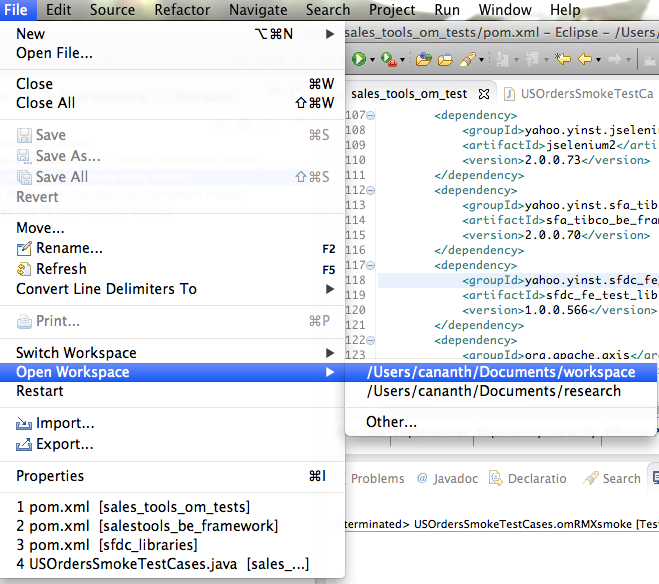
Once the plugin is installed, click on File --> Open Workspace.  Here you go, a new instance of eclipse is opened with a new workspace.


Monday, July 29, 2013

How to right click on a mac mouse

Initially I was puzzled on how do I right click on my new mac mouse. :-) If you have searched for this article, you also would have had the same question.

Navigate to System Preferences --> Mouse --> "Check" Seconday click --> Click on right side.

Once you are done with that you can right click on the mac mouse.

Thursday, July 25, 2013

How to convert XML to Java object and vice versa in runtime?

Well the obvious choice would be to use JaxB, due to its familiarity. Let us see it with a simple example. JAXB is governed by the same team as Glassfish. JAXB comes by default with JDK1.6+. JAXB stands for Java Architecture for XML Binding.

XML has become a common form of data storage in many applications and for webservices. There are two common operations that are required while dealing with XML from Java. Read an xml file and convert it to a Java object, and write a Java object to an xml file.

JAXB does both the above said operations and those operations are called as
  1. Marshalling – Convert a Java object into a XML.
  2. Unmarshalling – Convert a XML into a Java Object.
Let us see this with an example,
Marshalling: Converting Java object to XML
Its a simple process, lets see this with a sample program
Output
While running the above example you will run into the following exception,

Exception in thread "main" javax.xml.bind.MarshalException
 - with linked exception:
[com.sun.istack.internal.SAXException2: unable to marshal type "com.ananth.samples.Employee" as an element because it is missing an @XmlRootElement annotation]
at com.sun.xml.internal.bind.v2.runtime.MarshallerImpl.write(MarshallerImpl.java:317)
at com.sun.xml.internal.bind.v2.runtime.MarshallerImpl.marshal(MarshallerImpl.java:243)
at javax.xml.bind.helpers.AbstractMarshallerImpl.marshal(AbstractMarshallerImpl.java:75)
at com.ananth.samples.Java2XMLExample.main(Java2XMLExample.java:20)
Caused by: com.sun.istack.internal.SAXException2: unable to marshal type "com.ananth.samples.Employee" as an element because it is missing an @XmlRootElement annotation
at com.sun.xml.internal.bind.v2.runtime.XMLSerializer.reportError(XMLSerializer.java:216)
at com.sun.xml.internal.bind.v2.runtime.ClassBeanInfoImpl.serializeRoot(ClassBeanInfoImpl.java:286)
at com.sun.xml.internal.bind.v2.runtime.XMLSerializer.childAsRoot(XMLSerializer.java:462)
at com.sun.xml.internal.bind.v2.runtime.MarshallerImpl.write(MarshallerImpl.java:314)
... 3 more

To fix the above exception you have to add an @XmlRootElement annotation to your Employee Pojo.
Instead of System.out you can point to the File to which you want to write the output during jaxbMarshaller.marshal(employee, file);. Once make the change while rerunning the sample will give your the following output.
UnMarshalling: Converting XML to Java object
Its a simple process, lets see this with a sample program
Now, I had a question why do I should I have a @XmlRootElement annotation in my pojo.  Cant I do I deal with my existing POJOs of my application?
The answer is you cant do it with JAXB but there are other options like XStream. I have referred their two minutes tutorial and it really look me only 2 minutes to try it out.
Add the XStream maven dependency and after that it is as easy as calling toXML and fromXML methods of XStream object.